
How to Update Individual Product Page (OpenCart – Ecocana Sports)
This document explains how to edit individual product pages in OpenCart, including:
- SEO-friendly URL
- Page title / meta title
- Meta description
- Open Graph (OG) image
- Product title improvement
- Product overview improvement
- Product description formatting
Example product pages:
- https://ecocanasports.com/magura-brand?product_id=318
- https://ecocanasports.com/magura-brand/Magura-Brake-Caliper-Flat-Mount-Black-forMT4-MT8-SL-With-Rotatable-Tube-Connection
PART A [- How to Edit Product Basic Information]Information
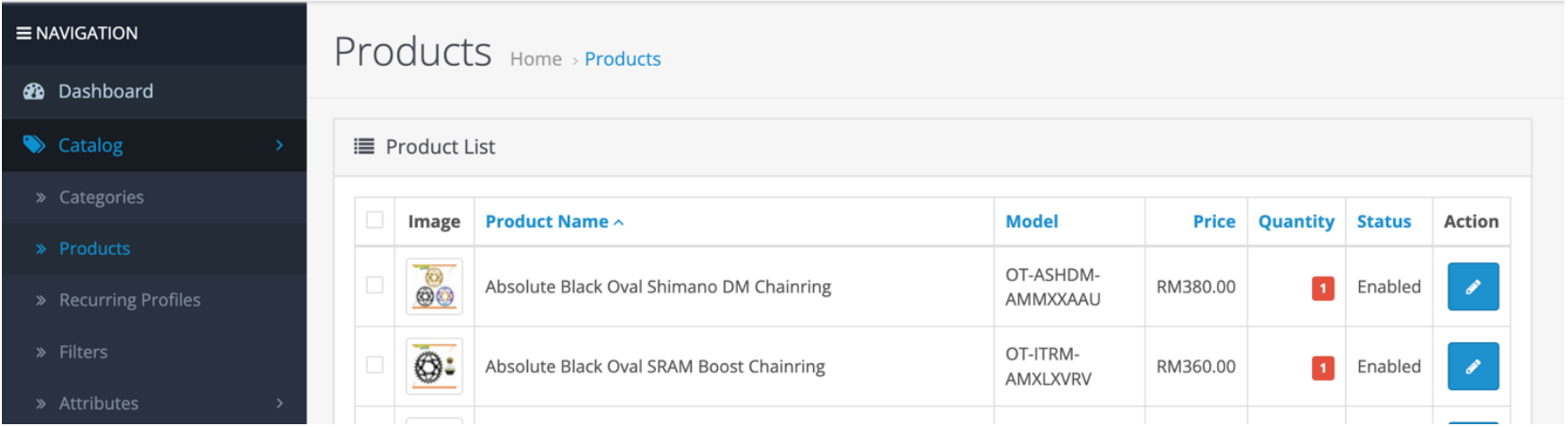
Open Product in Admin
Go to: Admin → Catalog → Products
- Search the product name.
- Click Edit.
PART B [- How to Make Product URL SEO Friendly]Friendly
Problem:
Instead of: https://ecocanasports.com/magura-brand?product_id=318
We want: https://ecocanasports.com/magura-brand/Magura-caliper-ebt-screw-bleeding-port-screw-without-packing
Step 1 – Open General Tab
- Inside Product
Edit:Edit page. - Go to General tab.
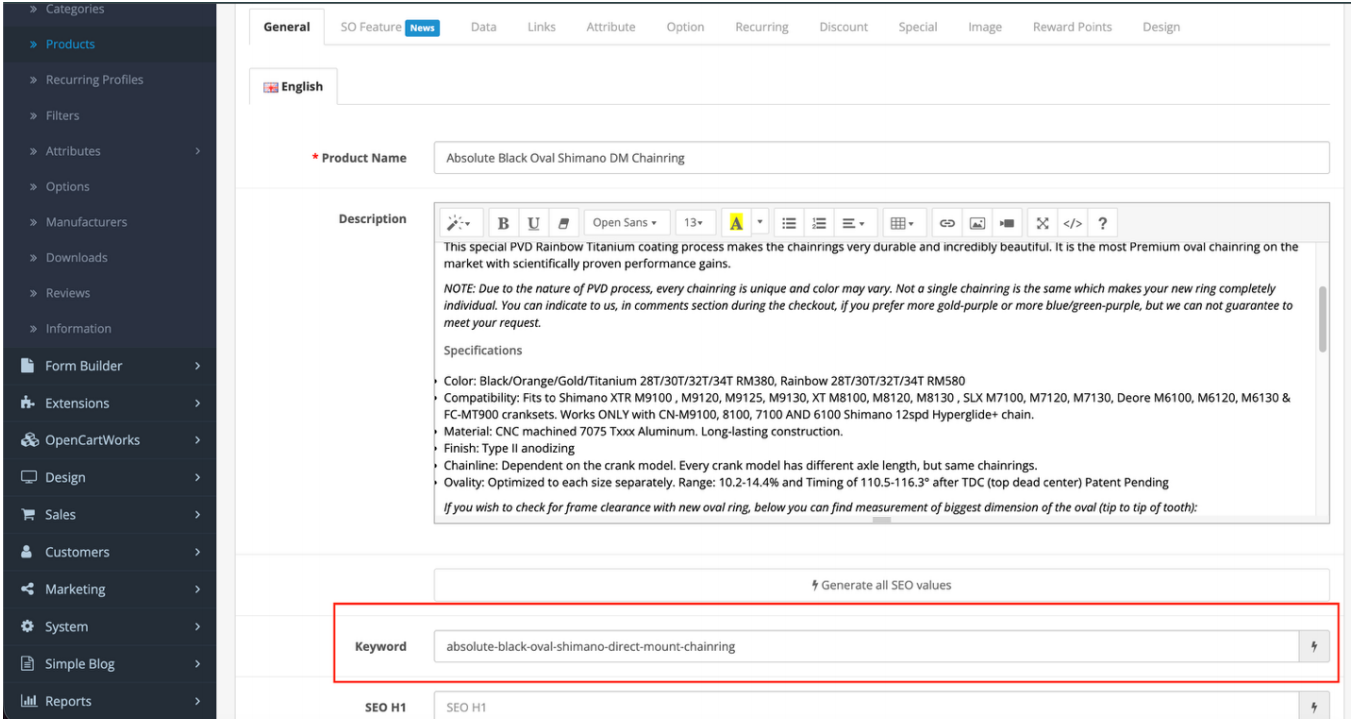
Step 2 – Add SEO Keyword
awdawdawdawdIn the SEO Keyword field:
- Enter a clean, lowercase URL
- Use hyphen (-)
- Avoid spaces, uppercase, or special characters
Example: absolute-black-oval-shimano-direct-mount-chainring
Click Save.
Important Reminder for Client
Always make sure:
- URL contains product name
- No random ID
- No uppercase
- Use hyphen instead of spaces
PART C - Page Title / Meta Title
Step 1 – Open General Tab
- Inside Product Edit page.
- Go to General tab.
Step 2 – Improve Product Title
- Instead of basic name like: Alugear 94 BCD Chainring
- Improve to: Alugear 94 BCD Round MTB Chainring (SRAM Compatible) – Lightweight CNC Aluminum
Recommended Naming Format
Use this structure: [Brand] + [Model Name] + [What it is] + [Key Feature / Compatibility]
Example: Alugear 94 BCD Round MTB Chainring (SRAM Compatible) – Lightweight CNC Aluminum
This improves:
- SEO ranking
- Click-through rate
- Keyword relevance
PART D - Meta Description
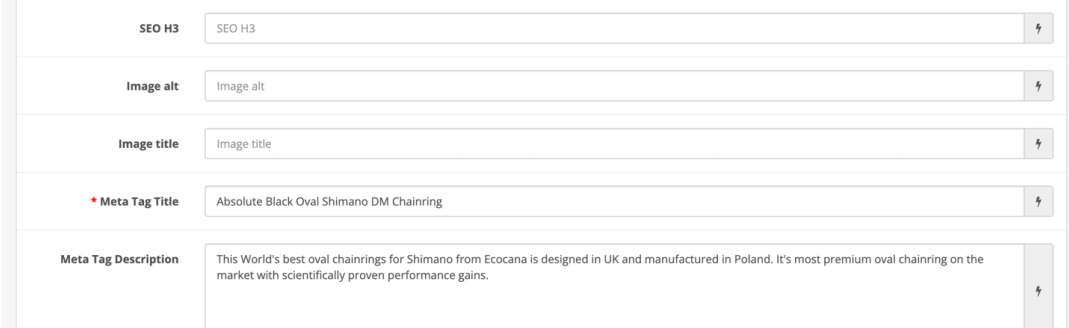
Step 1 – Scroll Down to Meta Description Field
1. In the General Tab, find Meta Tag Description.
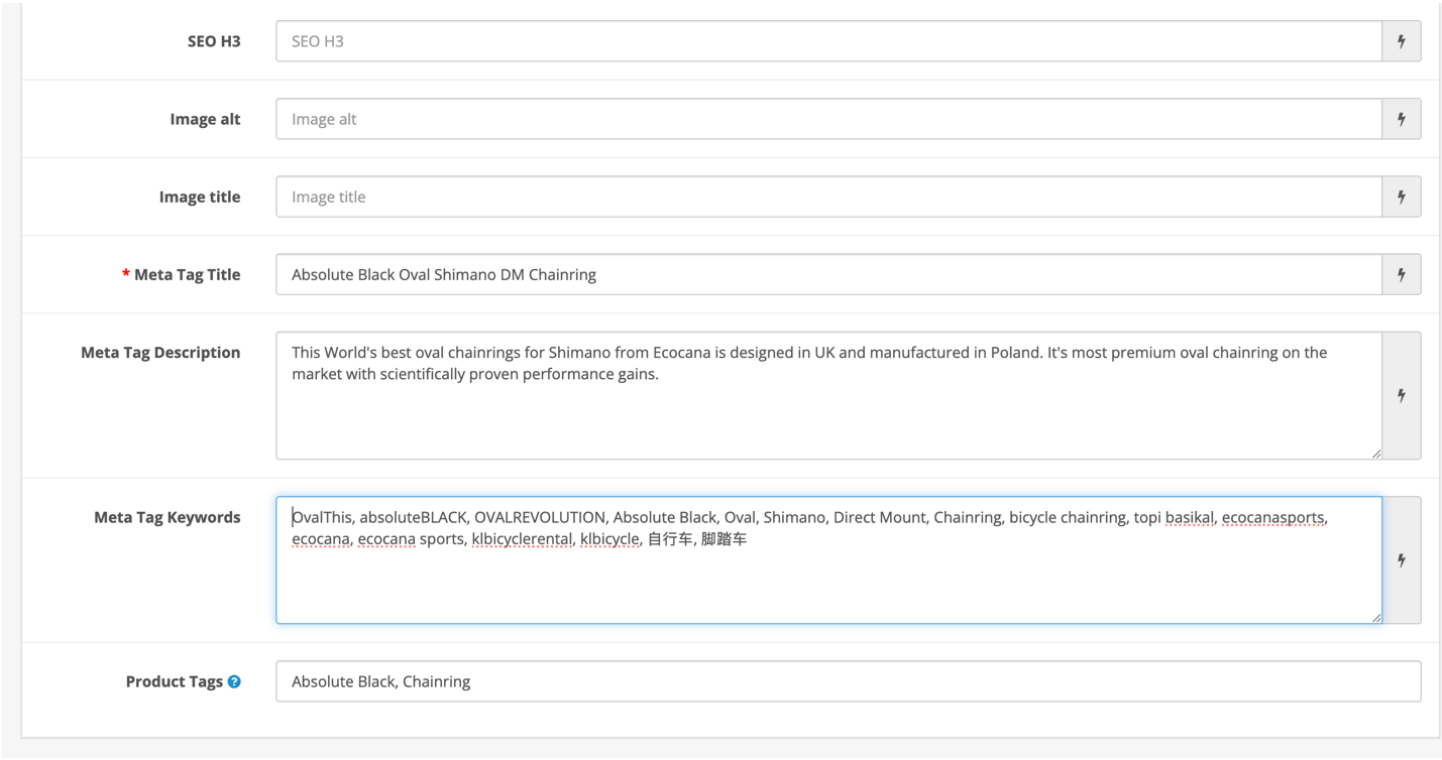
Rule
Meta Description should follow:
- Same content as product overview
- Include keywords
- Mention compatibility
- Mention MTB / bicycle upgrade context
Example:
Upgrade your drivetrain with the Alugear 94 BCD Chainring, one of the lightest CNC-machined chainrings for SRAM cranksets. Designed for 10, 11 and 12-speed setups, perfect for serious mountain bike upgrades in Malaysia.
PART E - Product Meta OG (Open Graph)
Open Graph image is usually pulled from:
- Product Image (Main Image)
Step 1 – Go to Image Tab
- Inside Product Edit page.
- Go to Image tab.
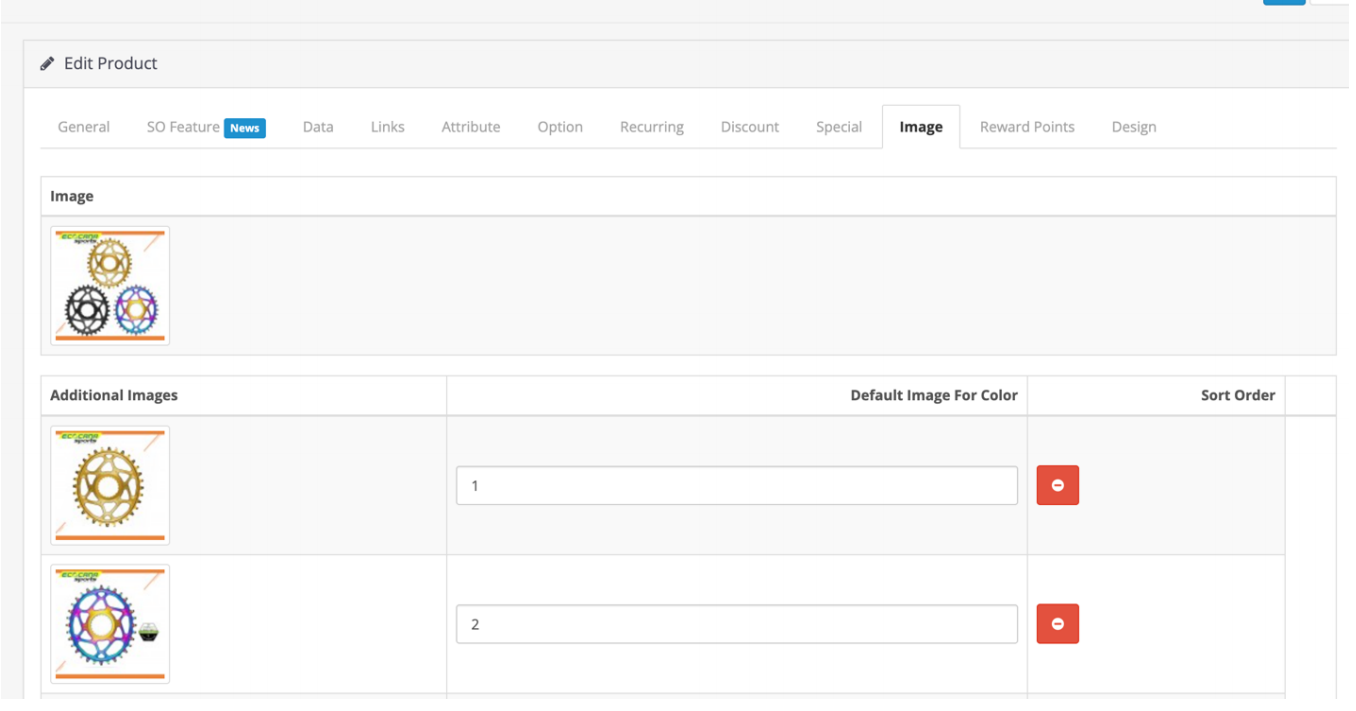
Step 2 – Make Sure:
- Main product image is uploaded
- High resolution
- Clean background
This image will be used when:
PART F - Product Overview Improvement
Where to Edit Overview?
- Go to: Product Edit → General Tab → Description Field (top section)
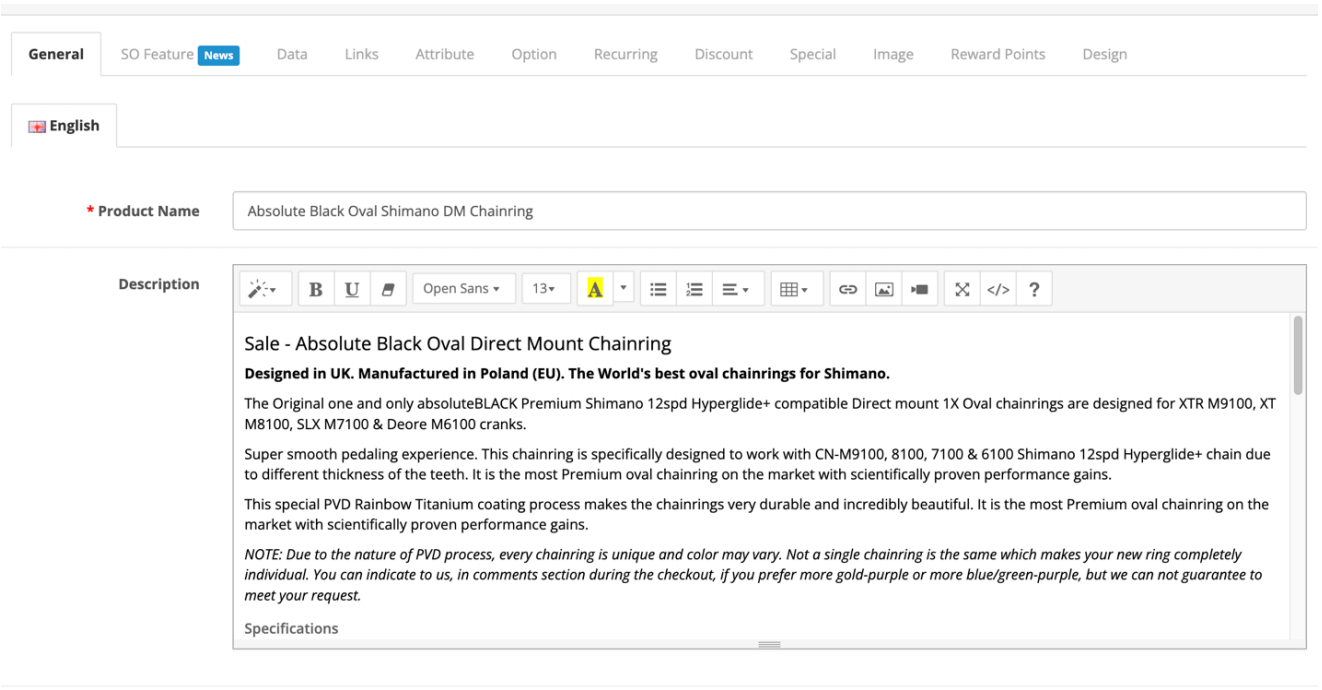
Overview Writing Guidelines
The overview MUST mention:
- Item Name
- Item Model
- Compatible for / Purpose
- Mountain bike upgrade / service context
Example Overview Format:
Upgrade your drivetrain with the Alugear 94 BCD Chainring, one of the lightest and most durable CNC-machined chainrings on the market. Designed specifically for SRAM cranksets, this premium 7075-T6 aluminum chainring offers precise chain retention and smooth pedaling for 10, 11, and 12-speed setups. The perfect bicycle upgrade part for weight-conscious Malaysian riders.
PART G - Product Description Improvement (Formatting)
We improve the formatting inside Description.
Example Page: https://ecocanasports.com/Alugear-94-bcd-round-mtb-chainring
Required Format Changes:
- Change from: TECHNICAL SPECIFICATIONS
- To: Technical Specifications
- Change from: COMPATIBILITY
- To: SRAM Crankset & Chain Compatibility
- Change from: INFORMATION
- To: Why Choose Alugear?
- Change from: RECOMMENDATIONS
- To: Installation Guide & Bolt Size
PART H - Final Checklist Before Saving
Before click Save, confirm:
- ✔ SEO URL added
- ✔ Product title improved
- ✔ Meta title matches product title
- ✔ Meta description added
- ✔ Overview paragraph added
- ✔ H3 formatting applied
- ✔ Product image uploaded
- ✔ No random product_id URL
Then click Save.
BEST PRACTICE SUMMARY
✔ Always use SEO-friendly URL
- ✔ Use improved naming format
- ✔ Include compatibility keywords
- ✔ Mention MTB / upgrade context
- ✔ Use H3 for section headings
- ✔ Use clean paragraph formatting
- ✔ Always check frontend after update